| MIX VERDICT: WAVES INTRIGGER DRUM REPLACER |
| THE TAKEAWAY: “InTrigger is a very intuitive product that brings much-needed relief to the task of drum replacement.” |
| COMPANY: Waves • www.waves.com PRICE: $49 PROS: • Highly accurate transient detection. • Easy editing of drum hits. • Deep layering and sample editing. CONS: • Minor bugs related to the COSMOS application. |
New York, NY (February 26, 2026)—For many mix engineers and producers, there are few tasks more loathed than tuning vocals and correcting multitracked drums. For drum replacement or augmentation, everyone knows that you’re going to be locked in for hours (or longer) chasing artifacts, correcting mis-triggered samples, adjusting gates, auditioning sounds, playing with layers and probably doing some minor surgery to the original files.
Thankfully, in recent years, several go-to products have been making strides toward streamlining this chore. Waves’ new InTrigger is the latest to, hopefully, provide some relief to the task of drum replacement.
If you’ve been following recent Waves product announcements, you’ve likely seen some items like the IDX Intelligent Dynamics or Curves AQ, where AI and a dead-simple interface are leveraged to help users speed up and simplify some fundamental aspects of the mixing process. Given this, it would be a logical assumption that InTrigger is a set-and-forget “easy button” that can polish up any sub-optimal drum track. The truth is, we’re probably still numerous product cycles away from that, but InTrigger certainly gets us a few steps closer.
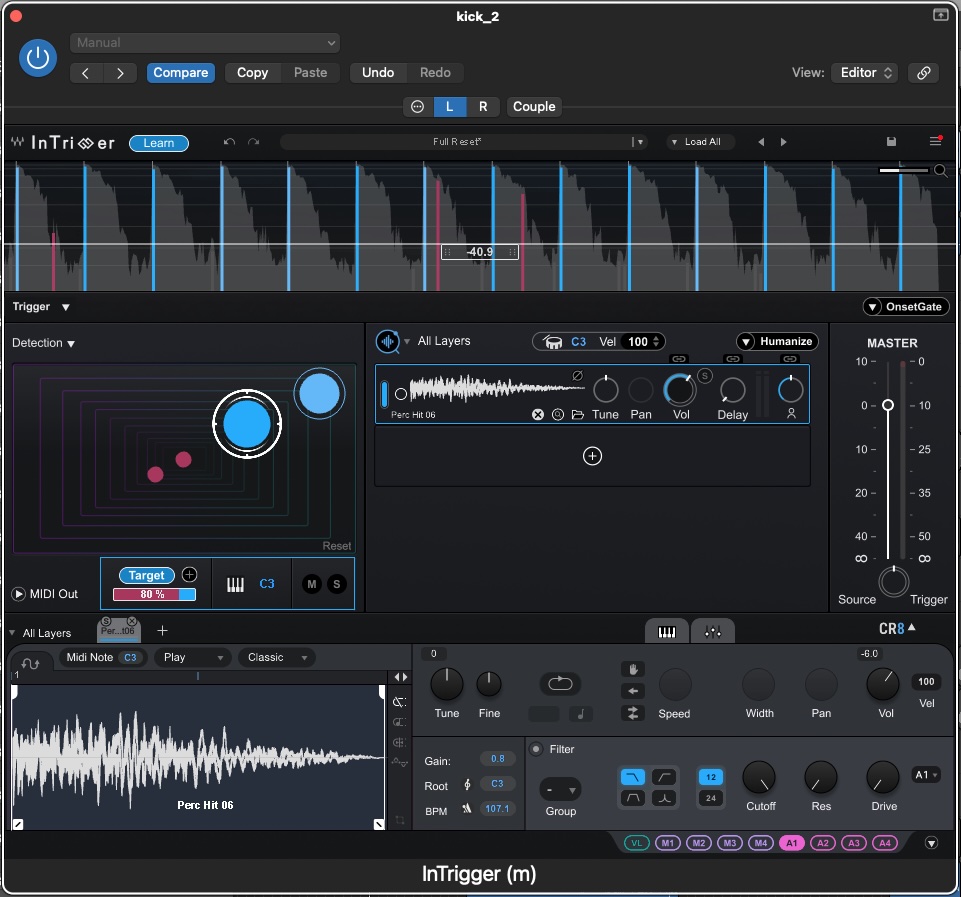
InTrigger is also something of a departure from Waves’ signal-processing collection of products, which often feature a pretty Spartan set of controls. This release is both surprisingly deep and relatively easy to use out of the box.
For the true studio alchemists, you can perform some pretty deep dynamic layering, tuning and sample editing. For users who are just trying to clean up some bleed or reinforce a kick and snare, you can quickly dial in some solid results.
The installation process for InTrigger is the same as for all current Waves products. Once you make a purchase in the company’s online store, installation and authorization all happen through the Waves Central application. For existing users, the process is pretty much instantaneous, while new users will need to register and start from scratch.
FULL AND LIVE
When opening your DAW, you will see two versions of InTrigger: the Standard instance, and a Live version that is optimized for— you guessed it—live sound applications. The main differences between the full and live versions are in the detection capabilities and latency. The Full version features a robust, highly sensitive detection engine, while the Live version includes a more basic threshold control for isolating drum hits and boasts zero latency.
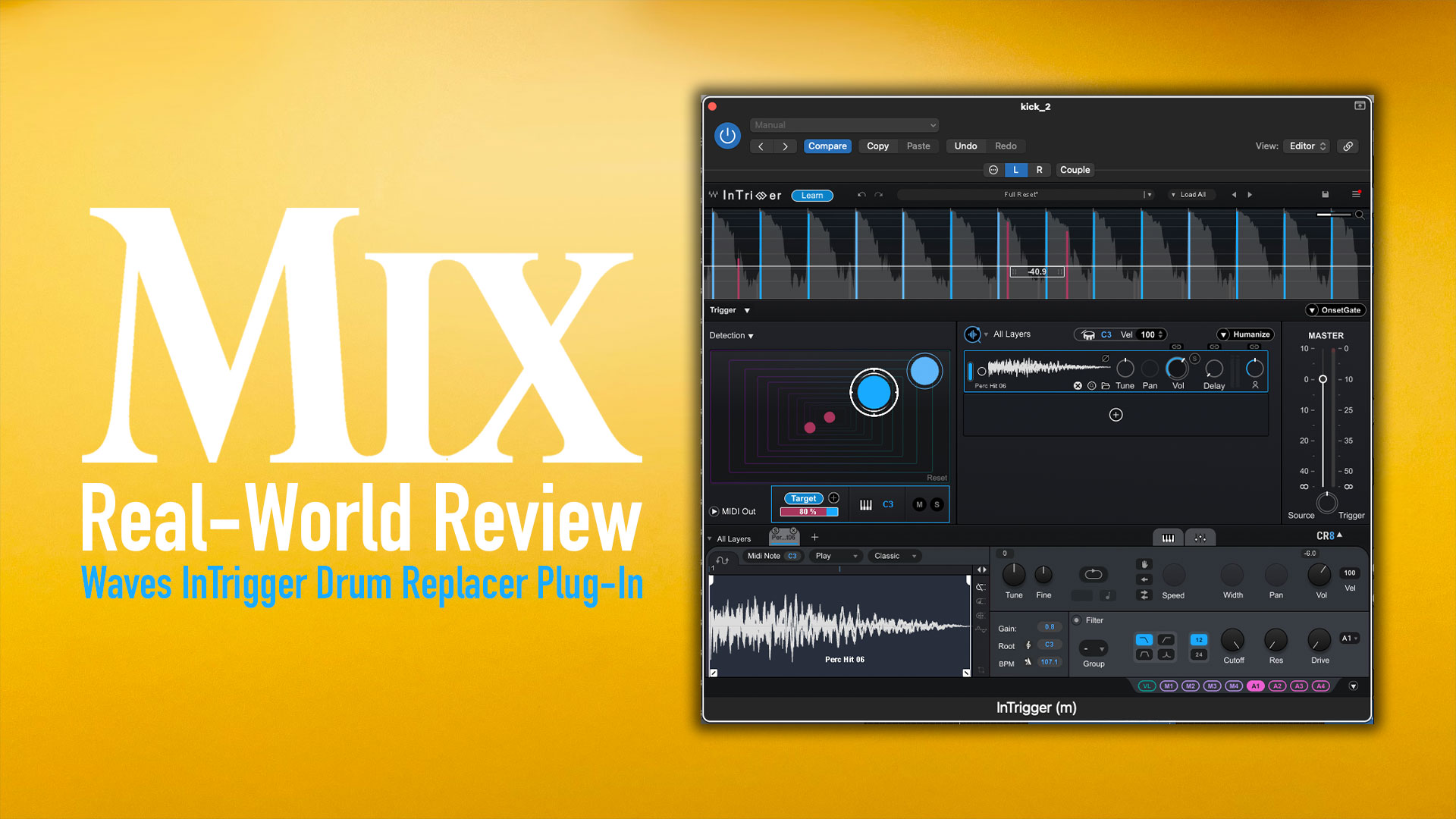
To get started, you drop InTrigger into, typically, the first plug-in slot in your chain. From here, you click the Learn button and start feeding it some signal. The software will begin analyzing the track and identifying target transients with a blue mark on the waveform display, with rejected hits in red. In practice, the initial results are 80% to 90% accurate, but you’re still going to need to go through each of your close-miked tracks and make some adjustments.
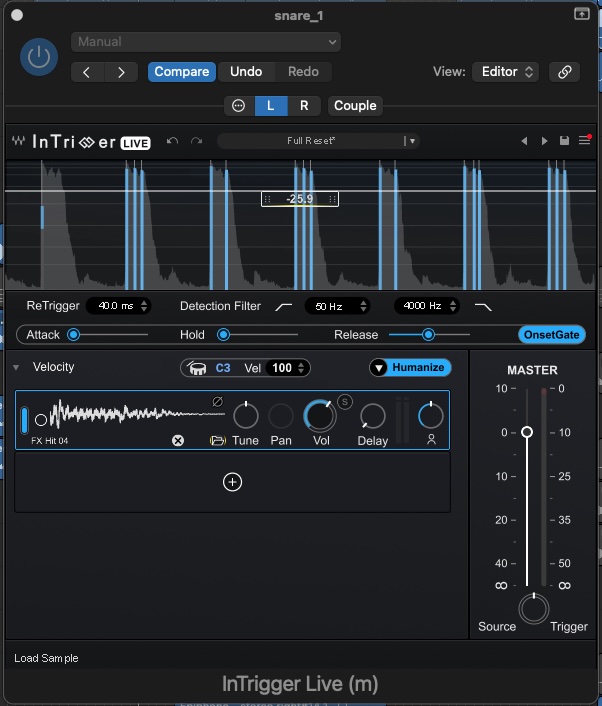
The available options include tweaking the “target” percentage in the detection pane, adjusting the gate settings (attack, hold and release), setting the overall threshold, and accepting or rejecting individual transient markers. This last feature is a bit of a standout for InTrigger. If you encounter a particularly busy or problematic section of a song where you’re getting some mis-triggers (think a busy tom fill), this option to reject some markers can prove very handy.
Overall, the detection engine’s results are, again, quite accurate, but the quality of the source material still matters a lot. If you’re dealing with a ton of bleed, achieving accurate results will still require additional manual work.
START THE LOAD-IN
Once you’re happy with the signal analysis and transient detection, it’s fairly straightforward to start loading in samples from either the included library (through the Waves COSMOS app) or your personal collection. A great feature of the sample section is the Humanize control, which adds a natural dynamic feel to either a single sample (a real time-saver) or across multiple layers.
Managing layers and samples is where the depth of this product starts to reveal itself. The interface can be expanded to show a basic mixer section (volume, pan, tune, etc.) and a very robust sample editor that lets you edit the waveform start/stop, apply an ADSR envelope, use low-, mid- and high-pass filters, and apply LFOs. It goes deep!
Discover more great stories—get a free Mix SmartBrief subscription!
Overall, InTrigger is a very intuitive product that brings much-needed relief to the task of drum replacement. The only notable bugginess occurred when trying to access the factory sample library. The plug-in would sometimes fail to access the COSMOS platform and default to a basic file search. Where the product shines is on close-miked kick, snare and tom tracks. If you’re looking to support a hi-hat within an overhead mic track, it’s possible to get usable results.
At the end of the day, InTrigger is a sample replacement product, not a stem splitter that can tease out information from a layered track. They’re probably saving that for Version 2.
• • •
SIDEBAR: INSIDE COSMOS
COSMOS plays a subtle but crucial supporting role in the InTrigger ecosystem, serving as the link between transient detection and selecting the right sounds to insert into a session. Essentially, it serves as a centralized sample manager that scans your existing libraries and applies AI-based categorization and tagging, making it much easier to work through both the factory library and your own sample collection to find the right one-shot.
For InTrigger users, the biggest upgrade in COSMOS V16 is its new DAW plug-in mode and session sync. Instead of auditioning samples in isolation, you can now preview kick, snare and tom samples directly in context. This is especially useful when reinforcing close-miked drums, where subtle pitch and envelope differences can determine the realism of a natural performance.
• Heavyocity Dystropia – A Mix Real-World Review
COSMOS also excels at reducing friction during sample selection. You can search broadly by instrument type, then gradually narrow results using tags, key, BPM or sonic characteristics. The ability to automatically group sonically identical samples is a helpful feature, especially for producers with extensive libraries full of nearly identical snare hits. It helps keep decision-making focused and prevents unnecessary clutter.
Overall, the navigation is flexible, offering waveform and list views depending on whether you prefer visual confirmation or detailed metadata. The Explore view takes it further by clustering similar sounds and allowing you to audition variations quickly, providing an efficient way to dial in complementary layers for InTrigger without having to search through multiple folders.
While COSMOS integrates closely with Waves’ CR8, it remains sampler-agnostic, making it a practical companion for InTrigger regardless of your broader workflow.