| MIX VERDICT: HISONG AIRSTUDIO S1 |
| THE TAKEAWAY: “The Hisong AirStudio S1 takes an interesting approach to recording, meeting the needs of its intended audience with stylish simplicity.” |
| COMPANY: Hisong • www.hisong.io PRICE: 4-in-1 Musician Kit ($299); 5-in-1 Creator Kit ($349); 6-in-1 Master Kit ($399) PROS: • Pocket-sized sound capture for recording and video without a lot of wires. • Well-thoughtout app. CONS: • Documentation is spread across web, print and videos. • Earbuds’ silicone ear tips have to be put on and removed every time. |
New York, NY (June 25, 2026)—Emerging musicians have a lot on their plates these days. It’s not enough to merely play music anymore; they also have to write, know how to record and also incessantly promote themselves online, which usually means they need to be content creators with a knack for video. All that work requires a fair amount of gear, and acquiring and learning the tools for each role can be a time-consuming and expensive challenge. Looking to answer all those issues is the new Hisong AirStudio S1, which is billed as an all-in-one mobile recording capsule.
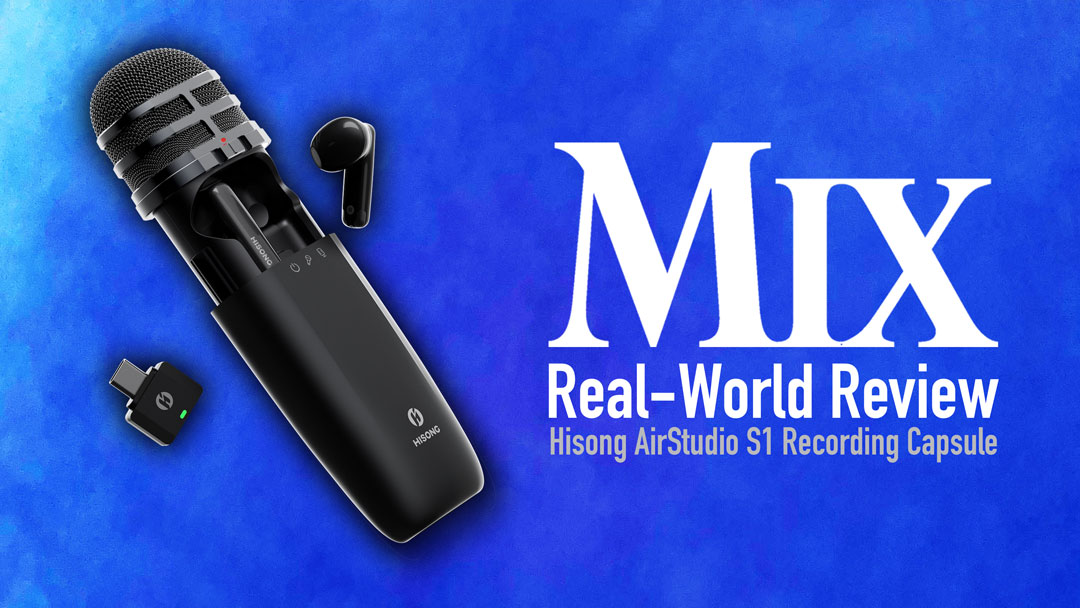
Aimed and priced at entry-level users, the AirStudio S1 combines most of those tools sets into a single “capsule”—a switchable cardioid/supercardioid mono microphone that also contains a USB-C audio output and a compartment for included wireless IEM ear buds. The capsule itself is the centerpiece of three different kits intended for various applications, each shipping with different accessories as needed.
The basic 4-in-1 Musician Kit ($299) includes the capsule, a USB-C cable, USB-A adapter, windscreen, silicone ear tips for the IEMs, a fold-up stand and a carrying case. The midrange 5-in-1 Creator Kit ($349) adds the RX Mini USB-C wireless receiver, which plugs into a smartphone or laptop, turning the capsule into a wireless mic when recording or shooting video. The flagship 6-in-1 Master Kit ($399) includes all of the above plus the RX Plus Main Receiver—a second receiver which can connect with a USB-C device or via a 1/8-inch output, so you can link it to a camera, mixer, guitar amp and so on. That doesn’t mean the RX Mini goes to waste; instead, the capsule can wirelessly transmit audio to both the RX Mini and RX Plus simultaneously, so you can send audio to multiple destinations as needed. Hisong provided the 6-in-1 Master Kit for review.
Tying it all together is the free Hisong Link app, which lets you configure the various tools—for instance, linking the wireless IEMs to the capsule—but it can also tackle audio and video recording as well. Additionally, for users who don’t already have a DAW of choice, the AirStudio S1 comes with Steinberg Cubasis LE for iOS and Cubase LE.
THE CAPSULE
As the centerpiece of the AirStudio system, the capsule is a cleverly designed piece of kit—a slim unit roughly the size of a small TV remote. The capsule and grille slide upwards to reveal compartments for the IEMs and the RX Mini; as a nice touch, those interior spaces are magnetized, so the accessories snap into place and stay put when you stow them away.
At the base of the front grille is a slider that lets you choose between Off, Extended Dynamic Mode and Condenser Mode for the mic; below the back grill are mute and volume buttons. At the bottom of the unit is a USB-C port so you can use the included USB-C cable to connect the capsule directly to your phone or laptop.
The IEMs, used for monitoring and playback while recording, sound respectable, but sit loosely in the ear; you have to slide them into the silicone ear tips for them to really stay put—which means you have to remove the silicone tips later on to put the buds away inside the capsule.
HISONG LINK
The Hisong Link app is divided into three sections—Music Production, Content Creation and Live Performance.
Music Production offers two recording modes—OneTrack and DualTrack; OneTrack allows you to record the mono microphone, while DualTrack lets you record the mic while additionally playing a backing track off your phone. The result is bounced down to a single track without any mixing per se, so it’s best used for capturing an idea or rehearsing. Various effects are available in the app—mic EQ, compressor, reverb, noise reduction and a limiter—and you can save grouped presets of your preferred settings, all of which can be recalled either in the app or with a long press of the mic’s mute button.
The Content Creation section has the same audio features but adds video, allowing you to record video through front or back cameras, offering frame rates of 24, 30 or 60 fps, and video quality of 720p, 1080p or 4K. As in recording with the unit, you can play a backing track if you like, and mic effects, muting and selectable mic gain are available as well.
Lastly, the Live Performance section gives you direct access to the mic effects and preset settings in case you want to use the microphone and effects without having to record audio or video.
IN USE
The AirStudio S1 capsule has a clean, simple design that makes it look less complex than it actually is. Depending on what you want to accomplish with the unit, you’ll want to spend some time with it practicing setup; linking the capsule, IEMs and your recording device; deciding how the RX Plus receivers best integrate into your workflow; and familiarizing yourself with the app. The Hisong Link app has a support contact section as well as a Start Center which offers some documents and video tutorials. That said, the Hisong website features a number of alternate video tutorials that get more in-depth and are well worth watching.
The sound quality is decent for the price, and any content creators who feel awkward on camera holding other brands’ fuzzy cube mics will probably like the more traditional handheld microphone-shape of the Hisong capsule. I greatly preferred the microphone’s Condenser Mode, which was crisp and present, and more forgiving of being slightly off-axis, even as it rejected nearby sounds. The mic itself can pick up some handling noise, so using the fold-up stand is recommended if your use case allows it.
CONCLUSION
The Hisong AirStudio S1 is an ambitious debut product that tries to be a lot of things to a lot of people. Primarily it’s a system intended for musicians and content creators in search of an ultra-portable recording device, who want a few options (but not too many), need all of it to work with their smartphone, and who don’t want to deal with a million wires every time they use it. In those regards, the AirStudio S1 is a success.
The sound quality is fine for the tasks at hand, and the additional onboard effects allow users to get moderately granular with shaping sound captured by the capsule. The documentation—online, in the app and inside the booklets that come with the unit itself—is extensive and clear, though you have to bounce between all of them to get the full picture of what the capsule can do. I would have liked the unit to include a 1/4-inch or 1/8-inch input that would allow it to be used as an interface for an external mic, device or instrument, but perhaps that’ll appear in a future S2 model. For now, the Hisong AirStudio S1 takes an interesting approach to recording, meeting the needs of its intended audience with stylish simplicity.