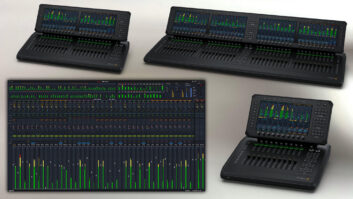
New York, NY (September 30, 2026)—In July, Blackmagic Design announced the final release of its new software-based live audio mixer, Fairlight Live, following a public beta release earlier this year. Running on macOS or Windows machines, Fairlight Live is being marketed by Blackmagic Design as suitable for everything from simple audio and video podcasts to complex live sports broadcasts, offering a host of features essential to those applications, such as IFB and mix-minus feeds, extensive comms and test tone functionality, and AFV capabilities for over 100 cameras.
Indeed, the software is so feature-rich that it’s impossible to get into the granular details here. Taking a high-level view, Fairlight Live handles thousands of audio channels, dozens and dozens of main output, aux, matrix, mix-minus and subgroup buses, and VCA groups. Native Fairlight channel processing may be augmented by third-party AU and VST plug-ins. The software is compatible with Core Audio, ASIO devices and SMPTE 2110 broadcast workflows and supports surround and immersive audio mixing. Live sound production-focused features include snapshots, virtual soundcheck recording and a dedicated player for audio and MIDI cues.
Fairlight Live is available free of charge from Blackmagic Design’s website.
PLAYS WELL WITH EVERYONE
Anyone familiar with Fairlight’s history may recall that the company, founded in Australia, introduced one of the first DAWs with integrated sampling, in 1979. Initially popular with well-to-do musicians and producers (the system was not cheap), Fairlight’s products evolved as the company’s fortunes changed over the decades, coming to focus on audio post production applications starting in the 1990s. The one constant was that Fairlight systems shipped as a package with proprietary hardware, but after Blackmagic Design acquired Fairlight in 2016, the software was untethered from the dedicated editing/mixing hardware and integrated into the company’s DaVinci Resolve video postproduction software suite.
Fast-forward to 2026 and the software has been retargeted into a new package designed from the ground up for the full range of live productions, including performances and broadcast. The system can simply run on a Mac or Windows laptop, but for those who prefer a tactile mixing surface, the company has also introduced three Fairlight Live Audio Panel models with up to 40 faders. Fairlight Live supports AFV setups with up to 128 cameras when interfaced with many of Blackmagic Design’s ATEM multi-camera live production switchers.
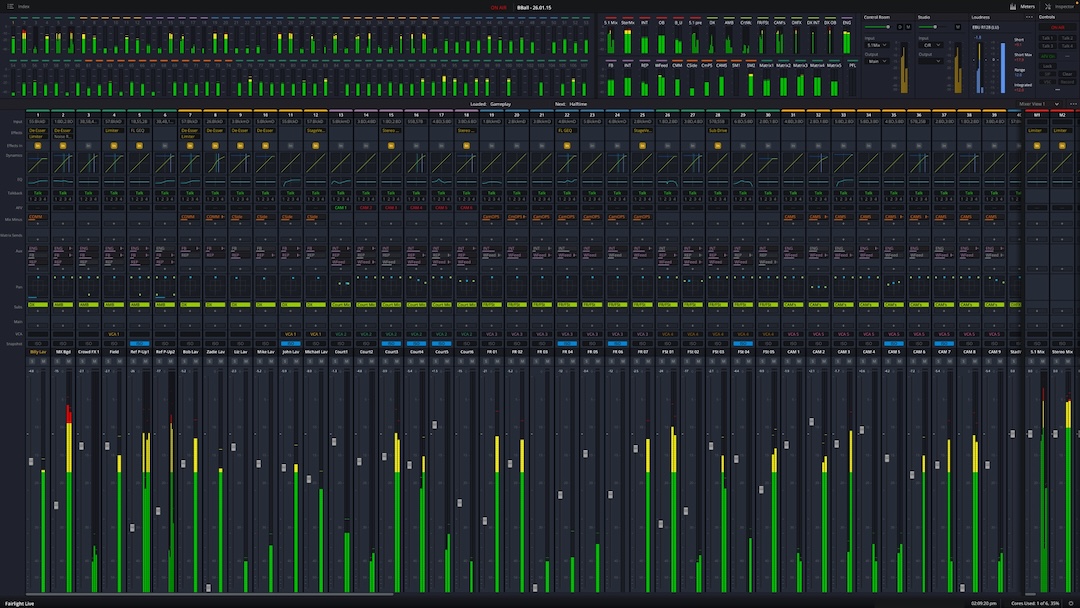
Since the software supports USB, Thunderbolt and Ethernet and computer audio standards, it is relatively easy to integrate with many of today’s popular digital audio interfaces and mixing consoles. For example, if computer audio is already integrated into a church live sound or broadcast setup, then Fairlight Live will almost certainly work with it. In fact, a lot of the initial enthusiasm following the software’s release has come from the church sound market, as evidenced by YouTube videos demonstrating how users have implemented Fairlight Live with their existing setups. Further, support for OSC and Mackie MCU extends control to auxiliary devices so that, say, musicians can mix their own monitors, or production staff can operate comms with a tablet or other device.
The system can be run in several modes. In primary mode, the system is standalone, with the operator in full control. Remote mode may be enabled to allow another operator to control the crowd mics, monitors, talkback or other aspects of the show. On Air mode locks out remote operators to prevent accidental changes to the main outputs. Failsafe mode adds failover redundancy for, say, critical broadcast applications, with a secondary system mirroring the primary.
FEATURE-RICH
In operation, Fairlight Live offers the features and capabilities you would expect of high-end live production software. As with any such system, regardless of operational mode, there is some preproduction programming necessary to configure a mix (best handled through the Index, Fairlight Live’s function list view), capture snapshots (with channel and function iso masking), set preferences and so on. Everything can be changed or modified on the fly, of course. The GUI can be customized to show only the components of the mix the operator needs to see, including on a second screen. For broadcast applications, in addition to the expected input and output metering, Fairlight Live offers a menu of the 10 most common loudness metering standards, which may be displayed graphically and numerically.
A mix is set up in what Fairlight Live calls a Show, which not only saves the system-wide settings but also all associated audio files. Blackmagic Design has tested the system with more than 2,000 channels, and users online have demonstrated capturing 200 tracks or more into the onboard player/recorder for virtual soundchecks, so capacity is unlikely to be a barrier for most users.
Native processing includes six-band EQ, expander/gate, compressor and limiter. Channel strips are laid out on the left side of the mixer with buses on the right but can be freely rearranged.
• Discover more pro audio news—get a free Mix SmartBrief subscription!
Using Fairlight Live’s Chain FX plug-in (previously introduced in DaVinci Resolve), which supports six plug-ins, up to a total of 24 plug-ins may be inserted per channel or bus via the available four slots. Of course, there is ultimately a finite amount of compute available in any digital audio system, so adding large amounts of channel processing and third-party plug-ins could tax the system and add latency, depending on the number of buses also in use. Channels include delay compensation.
The mixer provides 2D, 3D and spherical pan controls supporting formats from mono and stereo to 5.1, plus up to 5th order Ambisonics (5OA) and Apple Spatial Audio Format (ASAF). A graphic visualization appears on the channel which, when selected, calls up controls related to the format, including rotation, spread and divergence, plus dedicated LFE routing and level where applicable.
LIVE AUDIO PANELS
The optional Fairlight Live Audio Panels feature 10, 20 or 40 motorized faders ($2,415, $3,845 and $8,245, respectively) with a large touch display per 10-channel bay. Channels may be freely assigned to any of 12 layers, potentially putting up to 480 channels under fader control. Fader flip swaps aux level control to the faders.
A combination of function, channel select and soft controls in a logical layout around each screen allow the user to manipulate whatever function is selected on the display. Buttons on the upper right control a player/recorder offering virtual soundcheck functions and iso recording of all inputs, a cue player—a sort of virtual cart machine—and snapshots. Control room monitoring, bus and group master, and talkback switching are accessed below those.
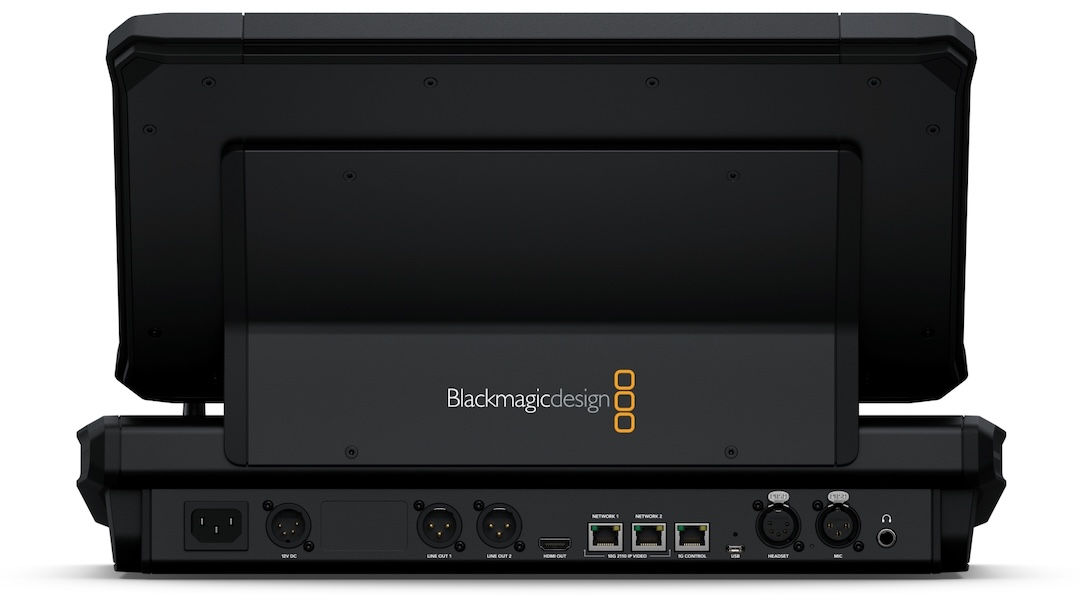
The rear panel includes a headphone jack (with a separate feed on the front), mic and talkback headset XLRs, XLR speaker outs, USB, and ST 2110 A/V network and control connections plus an HDMI connector. The 10-fader model supports battery-powered operation; the 20- and 40-fader versions have redundant power supplies.
For those working in A/V services or fixed installations, Fairlight Live, especially when integrated and synched with other pieces, can potentially centralize control of a multimedia show, from audio, MIDI and video to even lighting, or it could simply extend a church sound rig to manage a broadcast mix. The optional panels feature a rugged steel chassis, but it remains to be seen how well they stand up to the rigors of the road. Finally, for those whose interest is piqued by Fairlight Live but are seeking a more traditional DAW, DaVinci Resolve includes Fairlight’s dedicated sound design, recording, editing, sweetening and mixing software—and is also a free download from Blackmagic Design.